Identity, Authentication & Zero Trust in Copilot Studio + Microsoft Foundry Deployments
In Article 1, we established the governance blueprint — environments, DLP policies, maker permissions, and the Foundry security boundary. Now we go one layer deeper: **identity and authentication**.
This is where most enterprise Copilot Studio deployments have their biggest gap. It's not unusual to find production bots running on shared service accounts, custom connectors using hardcoded API keys, or Foundry agents connecting to Azure AI Search with an admin-level connection string copy-pasted from the portal.
These aren't edge cases. They're the default when teams prioritise speed over security.
This article gives you the correct patterns — Entra ID app registrations, managed identities for Foundry, OAuth2 flows in custom plugins, channel-level authentication, and Zero Trust enforcement. All with code you can use today.
The Identity Surface in Copilot Studio + Foundry
Before writing a single line of configuration, it helps to map every authentication handshake in a typical enterprise deployment:
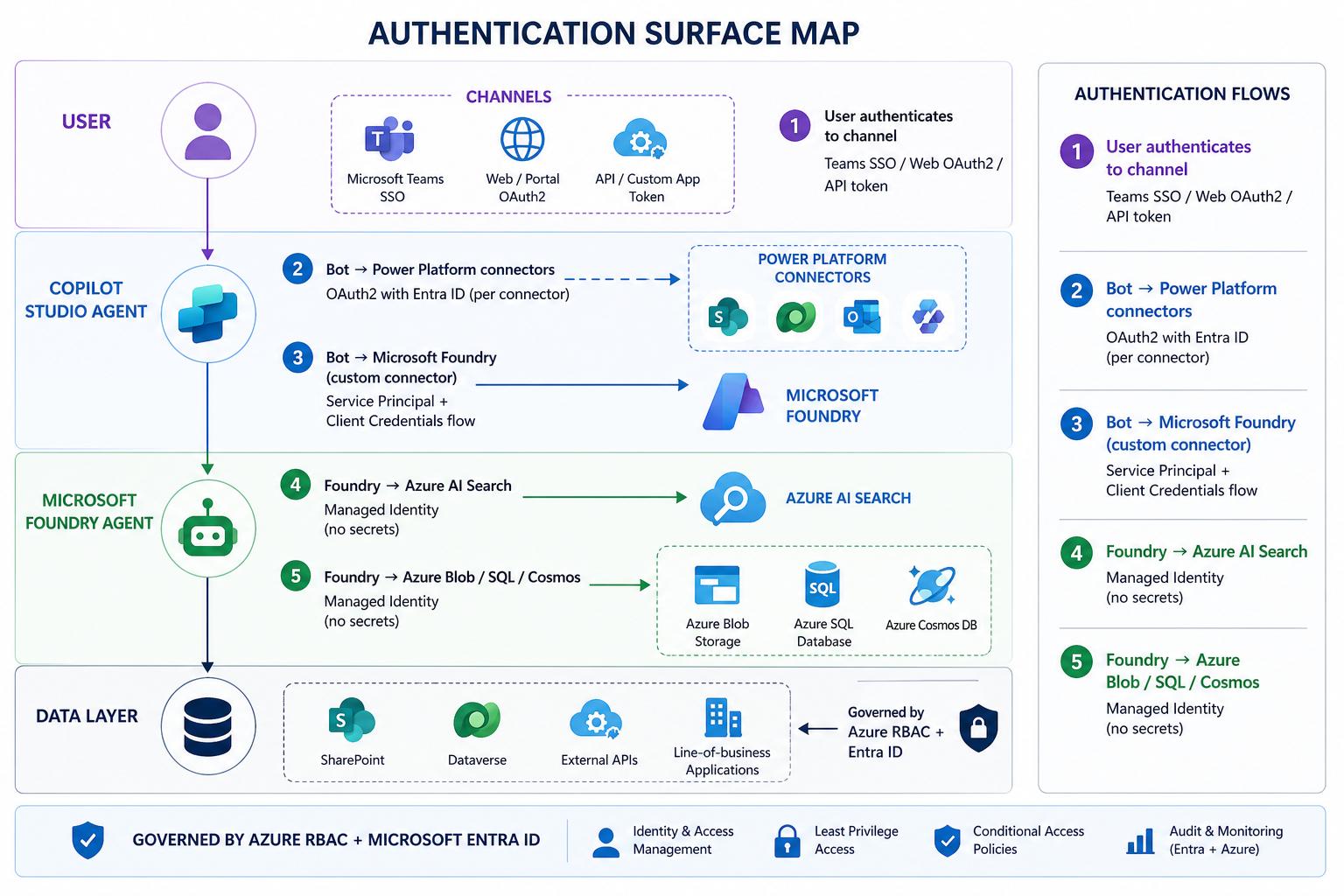
Each numbered handshake has its own correct pattern. Let's go through each one.
Handshake 1: User Authentication to the Channel
How a user proves their identity to a Copilot Studio agent depends on the channel. The three enterprise patterns are:
Teams Channel — SSO (Recommended)
Teams Single Sign-On is the gold standard for internal enterprise deployments. The user is already authenticated to Teams — the bot inherits that identity without a second login prompt.
Teams Client
└─▶ AAD Token (user's identity)
└─▶ Copilot Studio receives token
└─▶ Bot can call Graph API / SharePoint as the user
Configuration in Copilot Studio (Teams channel):
```yaml

# In Copilot Studio → Settings → Security → Authentication

Authentication: Microsoft (Azure Active Directory V2)

Tenant ID: your-tenant-id

Client ID:

Client Secret:

Scopes: User.Read openid profile offline_access

Token Exchange URL: api:///access_as_user

```
App Registration requirements for Teams SSO:
```json

{

  "displayName": "Copilot-Studio-Enterprise-Bot",

  "signInAudience": "AzureADMyOrg",

  "api": {

    "oauth2PermissionScopes": [

      {

        "value": "access_as_user",

        "type": "User",

        "adminConsentRequired": false

      }

    ]

  },

  "requiredResourceAccess": [

    {

      "resourceAppId": "00000003-0000-0000-c000-000000000000",

      "resourceAccess": [

        { "id": "e1fe6dd8-ba31-4d61-89e7-88639da4683d", "type": "Scope" },

        { "id": "14dad69e-099b-42c9-810b-d002981feec1", "type": "Scope" }

      ]

    }

  ]

}

```
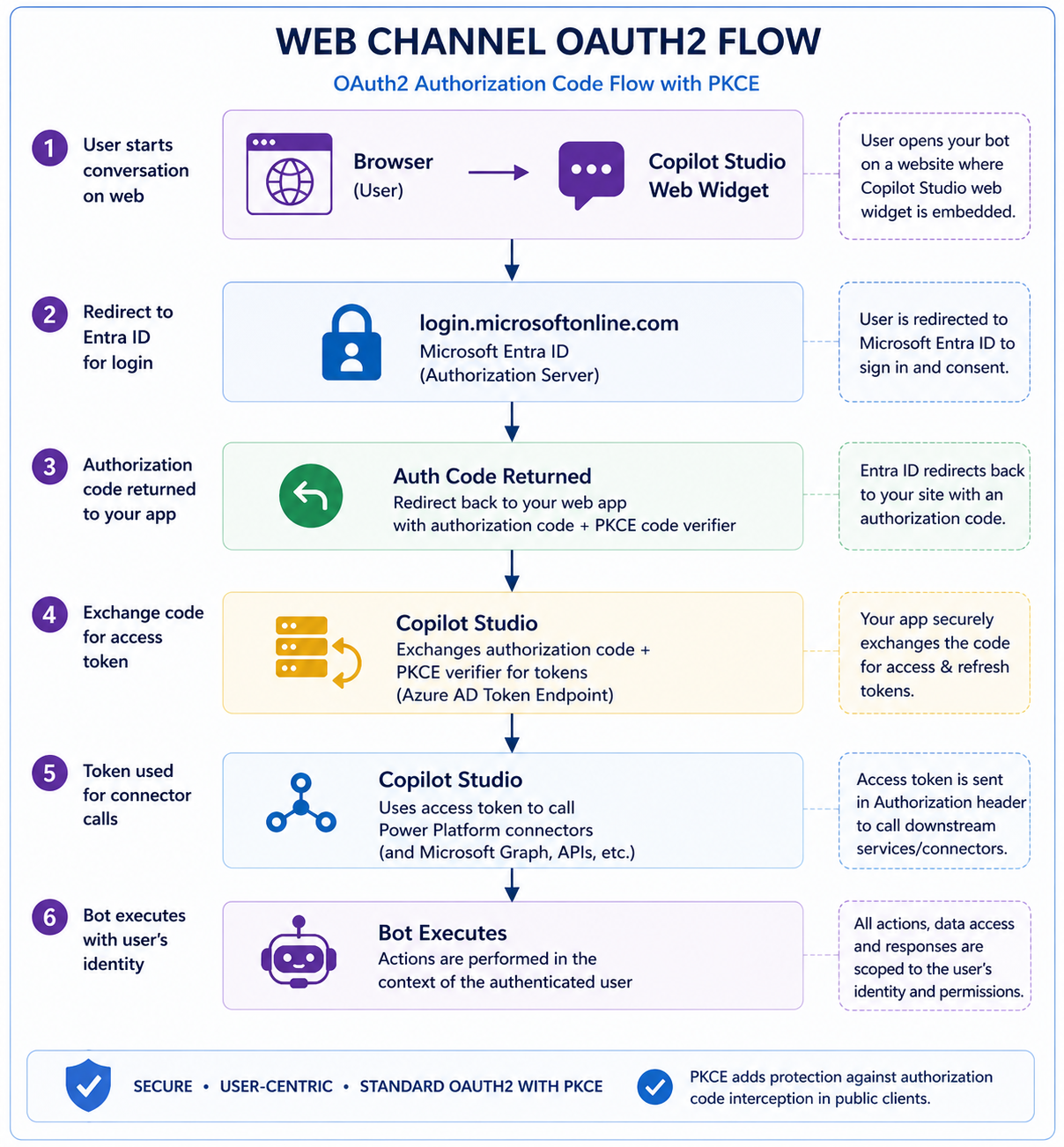
Web Channel — OAuth2 Code Flow
For external-facing bots on web, use the standard OAuth2 Authorization Code flow with PKCE:
Handshake 2: Copilot Studio → Power Platform Connectors
Every connector in Copilot Studio that accesses enterprise data must use OAuth2 with Entra ID — **never a shared service account password**.
The correct pattern for SharePoint, Dataverse, and Teams connectors:
```
Connection type: OAuth 2.0
Grant type: Authorization Code (for user-delegated)
Client Credentials (for app-only / service scenarios)
Identity: Entra ID App Registration (not a user account)
```
**Why this matters:** A shared service account means:
- One compromised password = all bots compromised
- No per-bot audit trail (who did what)
- Password rotation breaks everything simultaneously
**The correct approach — per-bot app registration:**
```powershell
# Create a dedicated app registration per bot (or per environment)
# Run once per environment during provisioning
$appName = "CopilotBot-HRAgent-Prod"
$tenantId = ""
# Create app registration
$app = New-MgApplication -DisplayName $appName `
-SignInAudience "AzureADMyOrg" `
-RequiredResourceAccess @(
@{
ResourceAppId = "00000003-0000-0000-c000-000000000000" # Graph
ResourceAccess = @(
@{ Id = "e1fe6dd8-ba31-4d61-89e7-88639da4683d"; Type = "Scope" } # User.Read
)
}
)
# Create a client secret (store in Key Vault — never in code)
$secret = Add-MgApplicationPassword -ApplicationId $app.Id `
-PasswordCredential @{ DisplayName = "Prod-Secret-$(Get-Date -Format 'yyyy-MM')"; EndDateTime = (Get-Date).AddMonths(12) }
# Store secret in Key Vault
az keyvault secret set `
--vault-name "kv-copilot-prod" `
--name "copilotbot-hragent-secret" `
--value $secret.SecretText
Write-Host "App: $($app.AppId) | Secret stored in Key Vault"
```
---
Handshake 3: Copilot Studio → Microsoft Foundry
This is the most architecturally important handshake—and the one most often implemented incorrectly.
The Copilot Studio → Foundry call must use a **Service Principal with Client Credentials flow**. Never a user-delegated token (the bot runs unattended), and never an API key.
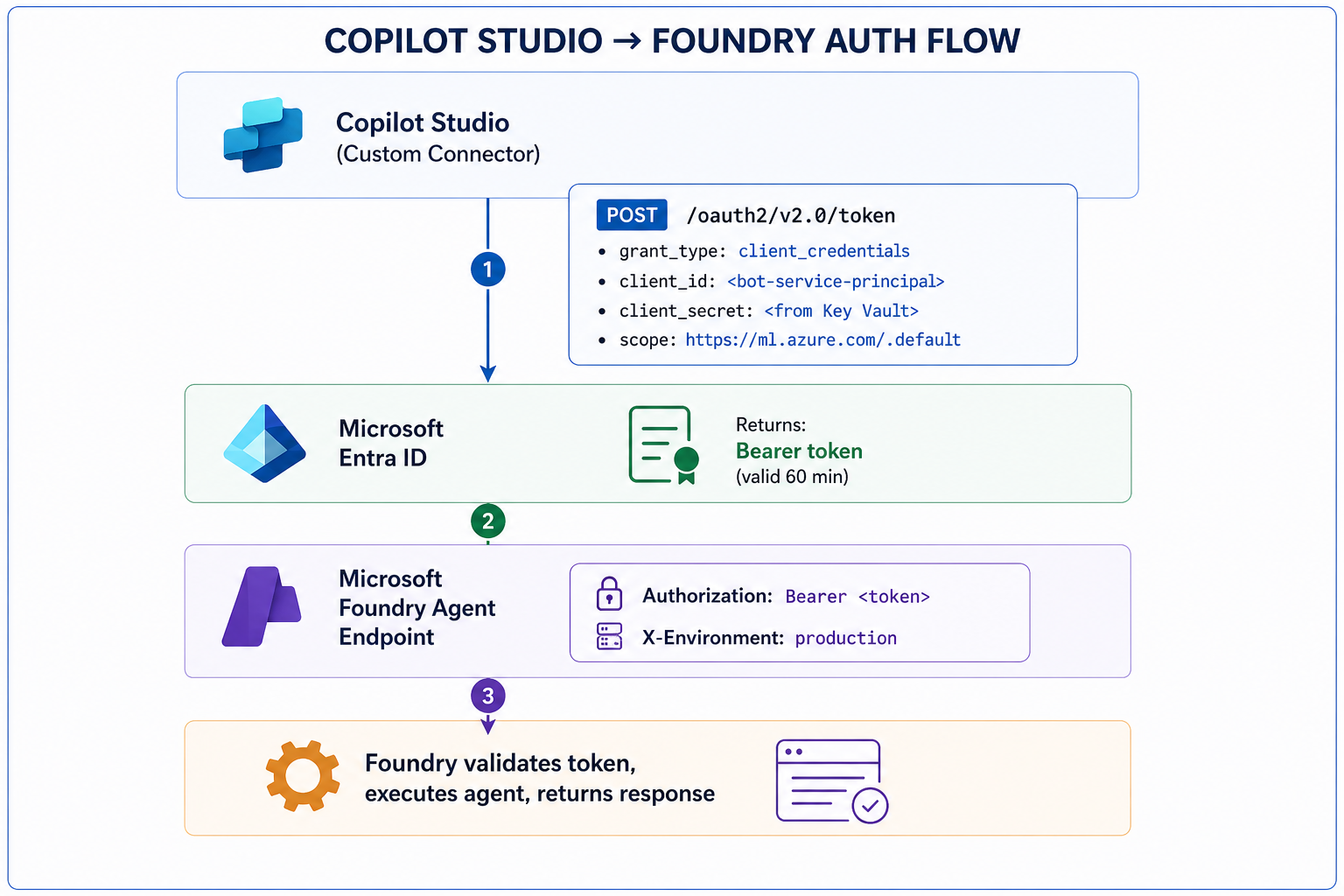
Custom Connector OAuth2 configuration:
```yaml

# Custom Connector → Security tab configuration

Authentication type: OAuth 2.0

Identity Provider: Azure Active Directory

Client ID:

Client Secret:

Authorization URL: https://login.microsoftonline.com/{tenant-id}/oauth2/v2.0/authorize

Token URL: https://login.microsoftonline.com/{tenant-id}/oauth2/v2.0/token

Refresh URL: https://login.microsoftonline.com/{tenant-id}/oauth2/v2.0/token

Scope: https://ml.azure.com/.default

```
Foundry-side: validating the incoming token
```python

# foundry_auth_middleware.py

# Validate that incoming requests to Foundry come from authorised callers


import jwt

from azure.identity import ManagedIdentityCredential

from azure.keyvault.secrets import SecretClient


ALLOWED_CLIENT_IDS = [

    "copilot-studio-prod-sp-client-id",

    "copilot-studio-test-sp-client-id"

]


def validate_caller_token(bearer_token: str) -> dict:

    """

    Validate the JWT token from Copilot Studio.

    Rejects calls from unauthorized service principals.

    """

    # Decode without verification first to get the kid (key ID)

    unverified = jwt.decode(bearer_token, options={"verify_signature": False})


    # Enforce: only known Copilot Studio service principals

    caller_client_id = unverified.get("appid") or unverified.get("azp")


    if caller_client_id not in ALLOWED_CLIENT_IDS:

        raise PermissionError(

            f"Unauthorized caller: {caller_client_id}. "

            f"Only registered Copilot Studio service principals are allowed."

        )


    # Enforce: token must be for this Foundry endpoint (audience check)

    audience = unverified.get("aud")

    if "ml.azure.com" not in str(audience):

        raise PermissionError(f"Invalid token audience: {audience}")


    return {

        "caller": caller_client_id,

        "environment": unverified.get("tid"),

        "issued_at": unverified.get("iat"),

        "expires": unverified.get("exp")

    }

```
Handshakes 4 & 5: Foundry → Data Resources (Managed Identity)
Once inside Foundry, **all downstream connections must use Managed Identity**. No connection strings. No API keys. No storage account access keys.
```python

# foundry_connections.py

# All Foundry agent connections use Managed Identity


from azure.identity import ManagedIdentityCredential

from azure.search.documents import SearchClient

from azure.storage.blob import BlobServiceClient

from azure.cosmos import CosmosClient


# Single credential instance — reused across all clients

credential = ManagedIdentityCredential()


# Azure AI Search — no API key

search_client = SearchClient(

    endpoint="https://prod-search.search.windows.net",

    index_name="enterprise-knowledge-index",

    credential=credential

    # RBAC role required: "Search Index Data Reader"

)


# Azure Blob Storage — no connection string

blob_client = BlobServiceClient(

    account_url="https://prodstorageaccount.blob.core.windows.net",

    credential=credential

    # RBAC role required: "Storage Blob Data Reader"

)


# Cosmos DB — no master key

cosmos_client = CosmosClient(

    url="https://prod-cosmos.documents.azure.com:443/",

    credential=credential

    # RBAC role required: "Cosmos DB Built-in Data Reader"

)
This pattern means
✅ No secrets in code or config files
✅ No secrets to rotate manually
✅ Full audit trail via Azure Monitor
✅ Credential automatically refreshed by Azure
Required RBAC assignments (provision via pipeline, not portal clicks):
```bash

#!/bin/bash

# assign-foundry-rbac.sh

# Run during environment provisioning — never manually in portal


FOUNDRY_MI_ID=""

SUBSCRIPTION=""

RG="rg-enterprise-ai-prod"


roles=(

  "Search Index Data Reader:/subscriptions/$SUBSCRIPTION/resourceGroups/$RG/providers/Microsoft.Search/searchServices/prod-ai-search"

  "Storage Blob Data Reader:/subscriptions/$SUBSCRIPTION/resourceGroups/$RG/providers/Microsoft.Storage/storageAccounts/prodstorageacct"

  "Cosmos DB Built-in Data Reader:/subscriptions/$SUBSCRIPTION/resourceGroups/$RG/providers/Microsoft.DocumentDB/databaseAccounts/prod-cosmos"

  "Key Vault Secrets User:/subscriptions/$SUBSCRIPTION/resourceGroups/$RG/providers/Microsoft.KeyVault/vaults/kv-copilot-prod"

)


for entry in "${roles[@]}"; do

  role="${entry%%:*}"

  scope="${entry##*:}"

  az role assignment create

    --assignee "$FOUNDRY_MI_ID"

    --role "$role"

    --scope "$scope"

  echo "✅ Assigned: $role"

done

```


---
Zero Trust Enforcement Checklist
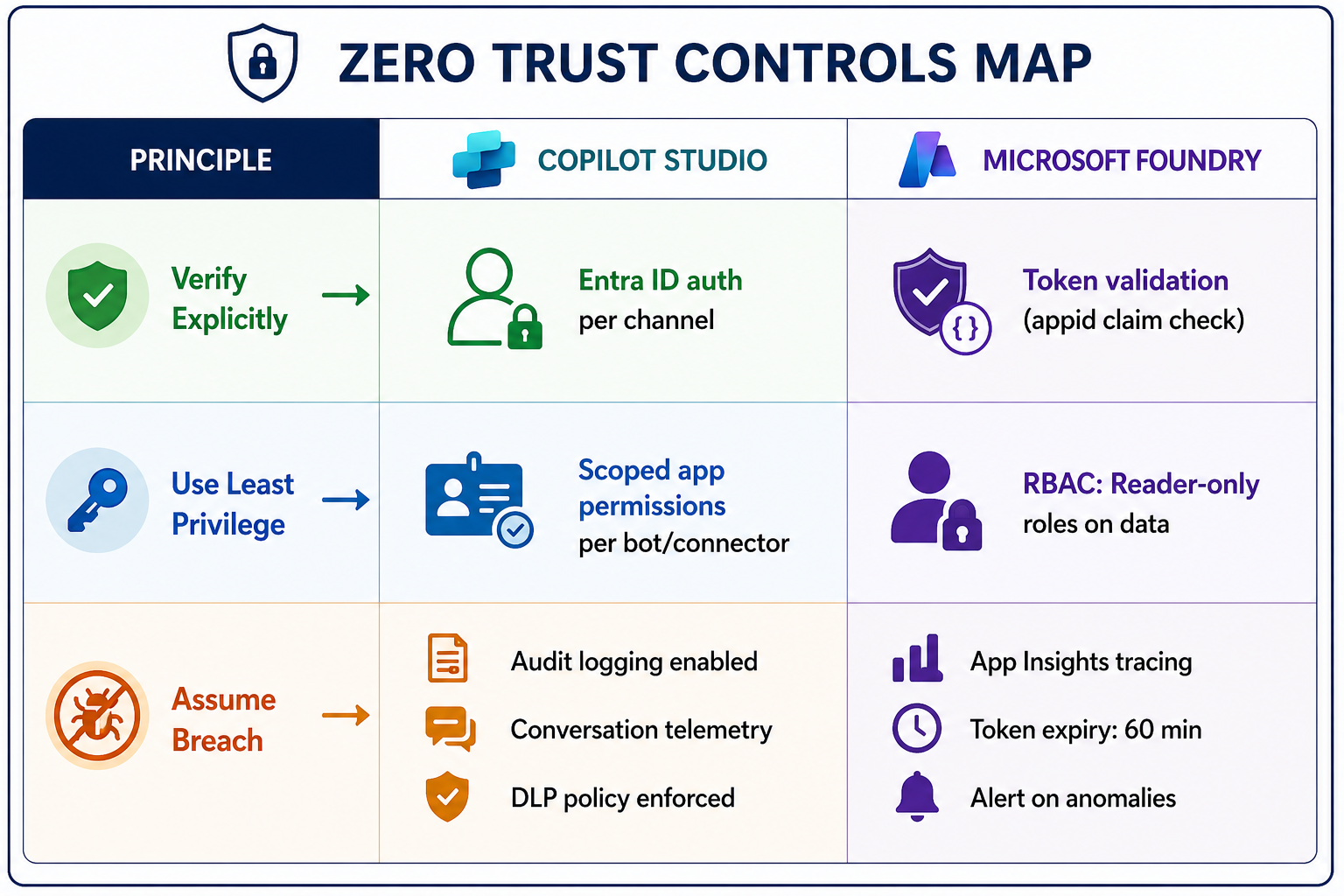
"Zero Trust" means **never trust, always verify**—even for internal service-to-service calls. Here's how it maps to Copilot Studio + Foundry:
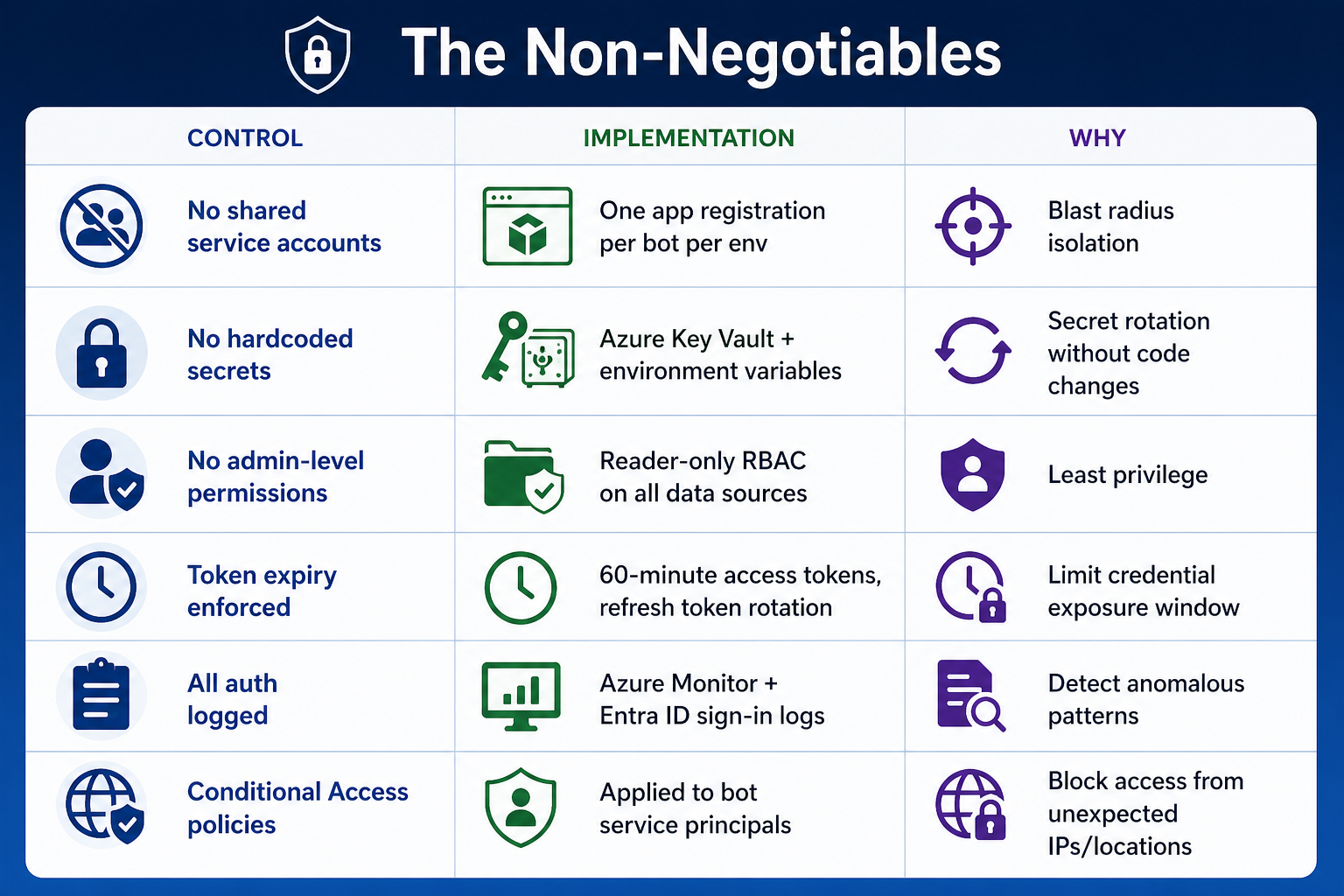
The Non-Negotiables
Applying Conditional Access to Bot Service Principals
This is an advanced control most teams skip—but it's worth implementing:
```powershell

# Apply Conditional Access to Copilot Studio service principals

# Restrict bot identities to known Azure regions only


$policy = @{

    DisplayName = "Copilot-Bot-ServicePrincipal-CA-Policy"

    State = "enabled"

    Conditions = @{

        Users = @{

            IncludeUsers = @("None")

            IncludeServicePrincipals = @("")

        }

        Locations = @{

            IncludeLocations = @("All")

            ExcludeLocations = @("")

        }

    }

    GrantControls = @{

        Operator = "OR"

        BuiltInControls = @("block")

    }

}
# Apply via Microsoft Graph

New-MgIdentityConditionalAccessPolicy -BodyParameter $policy

Write-Host "Conditional Access applied to bot service principal."
Key Takeaways
1. Map every authentication handshake before you write configuration — there are at least 5 in a typical Copilot Studio + Foundry deployment.
2. One app registration per bot per environment — never share credentials across bots or environments.
3. Client credentials flow for Copilot Studio → Foundry calls—not user-delegated, not API keys.
4. Managed Identity everywhere inside Foundry — no secrets in code, config, or environment variables.
5. Validate the caller in Foundry—check the `appid` claim to ensure only authorized Copilot Studio service principals can invoke your agents.
6. Provision RBAC via scripts, not portal clicks — repeatable, auditable, version-controlled.