Cost Governance & FinOps for Copilot Studio + Foundry: Controlling AI Spend at Enterprise Scale

Introduction
Most enterprise AI projects fail their ROI review — not because the technology didn't work, but because nobody owned the cost model.
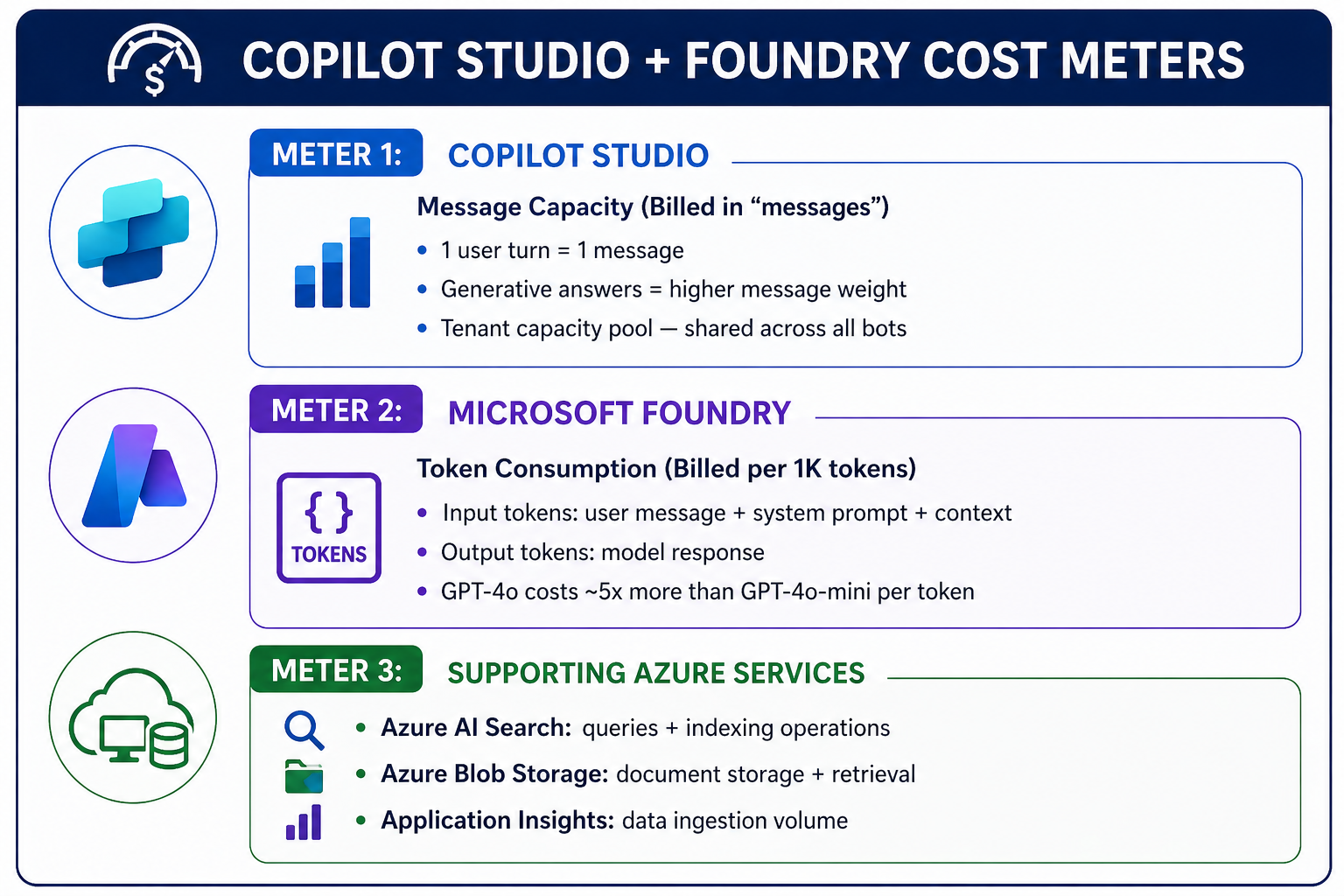
Copilot Studio + Microsoft Foundry has three distinct cost meters running simultaneously. If you don't govern all three, your AI program will hit budget walls mid-year with no visibility into why.
This article gives you the cost model, the alerting setup, and the FinOps controls to stay in front of it.
The Three Cost Meters
The Biggest Cost Levers
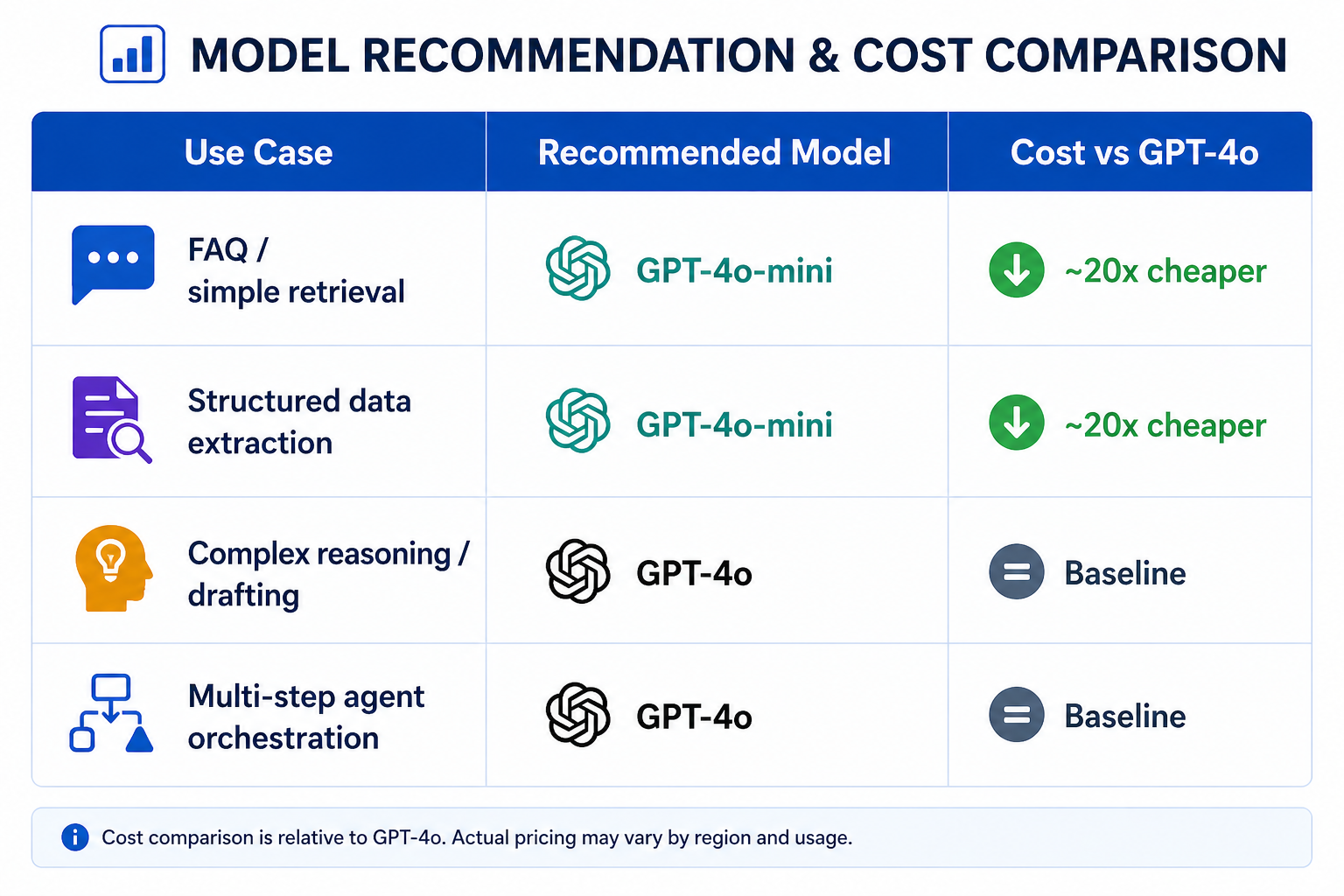
1. Right-size Your Model Selection
This is the single highest-impact FinOps decision. Most enterprise queries don't need GPT-4o.
# foundry_model_router.py
# Route queries to the right model based on complexity

def select_model(user_message: str, topic_classification: str) -> str:
    """
    Route to cheaper model for simple intents.
    Reserve GPT-4o for complex tasks only.
    """
    SIMPLE_TOPICS = ["faq", "policy_lookup", "status_check", "greeting"]
    COMPLEX_TOPICS = ["document_analysis", "multi_step_reasoning", "code_generation"]

    if topic_classification in SIMPLE_TOPICS:
        return "gpt-4o-mini"  # ~20x cheaper, handles 80% of enterprise queries

    if topic_classification in COMPLEX_TOPICS:
        return "gpt-4o"       # Full power only when justified

    # Default: classify with mini first, escalate if needed
    return "gpt-4o-mini"
2. Control Your System Prompt Length
System prompts are paid tokens on every single conversation turn. A 2,000-token system prompt on a bot handling 10,000 conversations/day = 20 million tokens/day just in system prompt overhead.
# Token audit — run this before deploying any Foundry agent

import tiktoken

def audit_system_prompt_cost(system_prompt: str, daily_conversations: int):
    enc = tiktoken.encoding_for_model("gpt-4o")
    prompt_tokens = len(enc.encode(system_prompt))

    daily_tokens = prompt_tokens * daily_conversations
    monthly_tokens = daily_tokens * 30

    # GPT-4o input pricing: $2.50 per 1M tokens (as of 2025)
    monthly_cost_usd = (monthly_tokens / 1_000_000) * 2.50

    print(f"System prompt tokens : {prompt_tokens:,}")
    print(f"Monthly token cost   : {monthly_tokens:,.0f} tokens")
    print(f"Estimated monthly $  : ${monthly_cost_usd:,.2f}")
    print(f"Tip: Every 100 tokens removed saves ${(100 * daily_conversations * 30 / 1_000_000) * 2.50:.2f}/month")

# Example usage
audit_system_prompt_cost(your_system_prompt, daily_conversations=10_000)
3. Cap Message Capacity per Bot
Copilot Studio draws from a shared tenant message pool. One runaway bot can exhaust capacity for the entire organisation. Set per-bot caps:
# Set message capacity limits per environment
# Prevents one bot from consuming all tenant capacity

Set-AdminPowerAppEnvironmentCapacity `
    -EnvironmentName "prod-environment-id" `
    -CapacityType "AIBuilderCredits" `
    -Capacity 5000  # Monthly message cap for this environment

# Alert when 80% consumed
New-PowerPlatformAlertPolicy `
    -EnvironmentName "prod-environment-id" `
    -AlertType "CapacityThreshold" `
    -Threshold 80 `
    -NotificationEmail "coe-team@contoso.com"
Cost Allocation by Department
Without tagging, all AI costs land in one bucket. Implement cost allocation from day one:
# Tag all Foundry resources at provisioning time
# Enables cost reporting by department, bot, and environment
az resource tag
--ids "/subscriptions/{sub}/resourceGroups/rg-foundry-prod"
--tags
Department="HR"
BotName="HR-Policy-Agent"
Environment="Production"
CostCenter="CC-1042"
Owner="jane.doe@contoso.com"
# Create Azure Cost Management budget per department tag
az consumption budget create
--budget-name "Foundry-HR-Monthly"
--amount 500
--time-grain Monthly
--start-date "2026-05-01"
--end-date "2027-04-30"
--filter "tags.Department eq 'HR'"
--notifications '[{
"enabled": true,
"operator": "GreaterThan",
"threshold": 80,
"contactEmails": ["coe-team@contoso.com", "hr-it@contoso.com"]
}]'
FinOps Dashboard: The 4 Metrics That Matter
Don't drown in Azure cost data. Track these four:
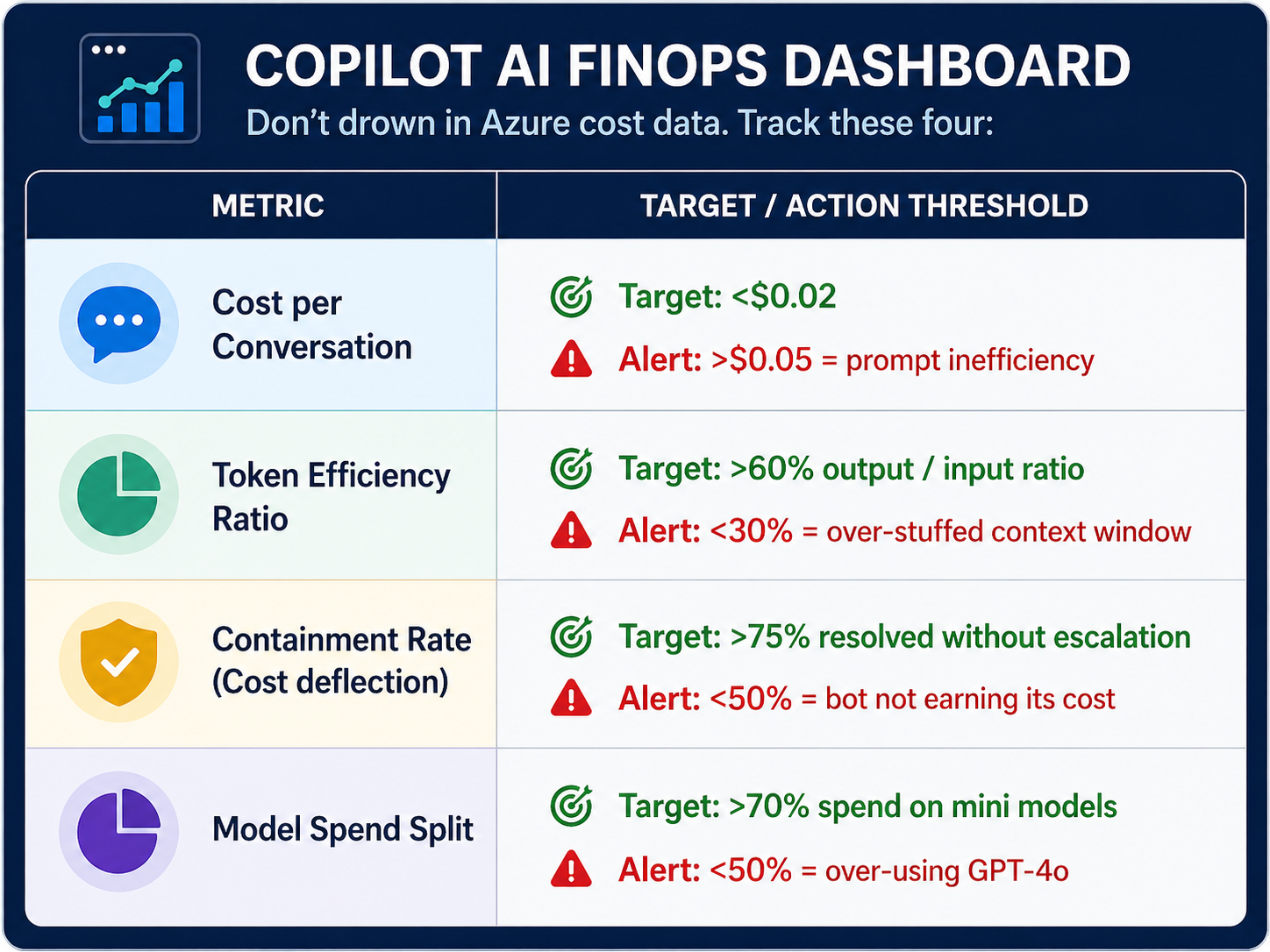
Query these in Azure Monitor / Log Analytics:
// Cost per conversation — Foundry token usage
AzureDiagnostics
| where ResourceType == "FOUNDRY/AGENTS"
| summarize
    TotalInputTokens = sum(inputTokens_d),
    TotalOutputTokens = sum(outputTokens_d),
    ConversationCount = dcount(sessionId_s)
    by bin(TimeGenerated, 1d), tostring(tags_Department_s)
| extend CostUSD = ((TotalInputTokens / 1000000) * 2.50) + ((TotalOutputTokens / 1000000) * 10.00)
| extend CostPerConversation = CostUSD / ConversationCount
| project TimeGenerated, Department=tags_Department_s, CostPerConversation, CostUSD
| order by TimeGenerated desc
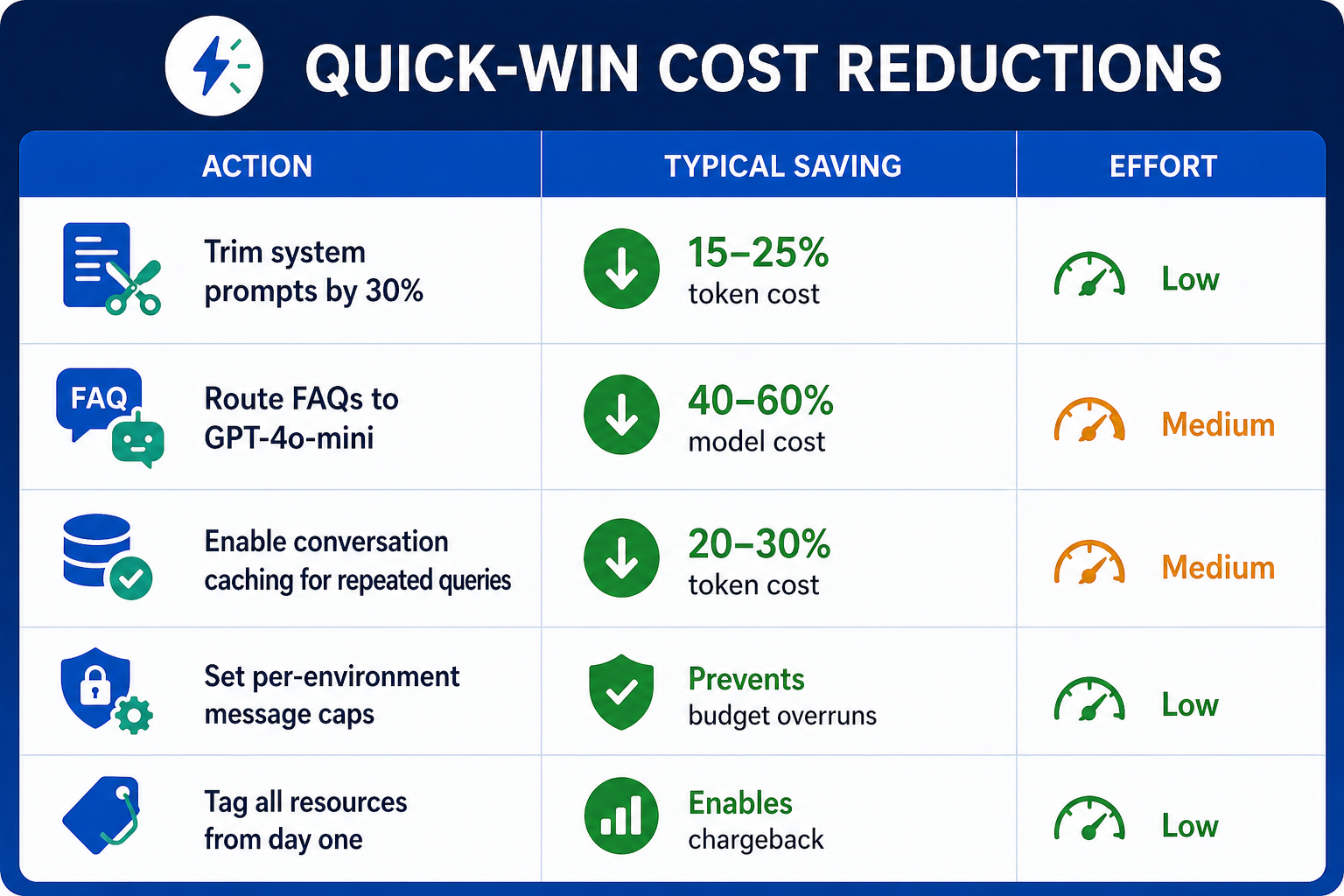
Quick-Win Cost Reductions
 |
Key Takeaways
- Three meters, one budget — Copilot Studio messages, Foundry tokens, and Azure services must all be tracked together.
- Model routing is your biggest lever—GPT-4o-mini handles 80% of enterprise queries at 5% of the cost.
- System prompt bloat is silent spending — audit token length before deploying any agent.
- Tag everything at provisioning — cost allocation without tags is impossible to retrofit.
- Track cost per conversation, not total spend — it's the only metric that tells you whether your AI is efficient.