Enterprise Governance Blueprint for Copilot Studio
Microsoft Copilot Studio has lowered the barrier to enterprise AI dramatically. Solution architects, business analysts, and even non-technical makers can now build and deploy conversational AI agents connected to business data, Microsoft 365, Dynamics 365, and custom APIs — all without writing a single line of code.
But with that democratization comes a problem nobody warned you about in the documentation.
When I work with enterprise clients, the first question I get after a successful proof-of-concept is never "how do we scale this?" It's always: *"Who owns this? Who can change it? What happens if a maker accidentally exposes sensitive SharePoint data through a bot? What if someone builds an agent that calls our ERP system without IT knowing?"*
These are governance questions. And **Microsoft's documentation tells you how to build. It rarely tells you how to govern.**
This article is the blueprint I give to every enterprise I work with. It covers the full governance model — environment strategy, DLP policies, connector governance, maker permissions, and the critical change that Microsoft Foundry introduces to the security boundary. It's the article every CoE lead, solution architect, and enterprise architect needs before they allow their organization to go beyond pilot.
The Governance Problem at Scale
Let's be precise about what "governance" means in the Copilot Studio context. It's not just access control. It's the intersection of four dimensions:
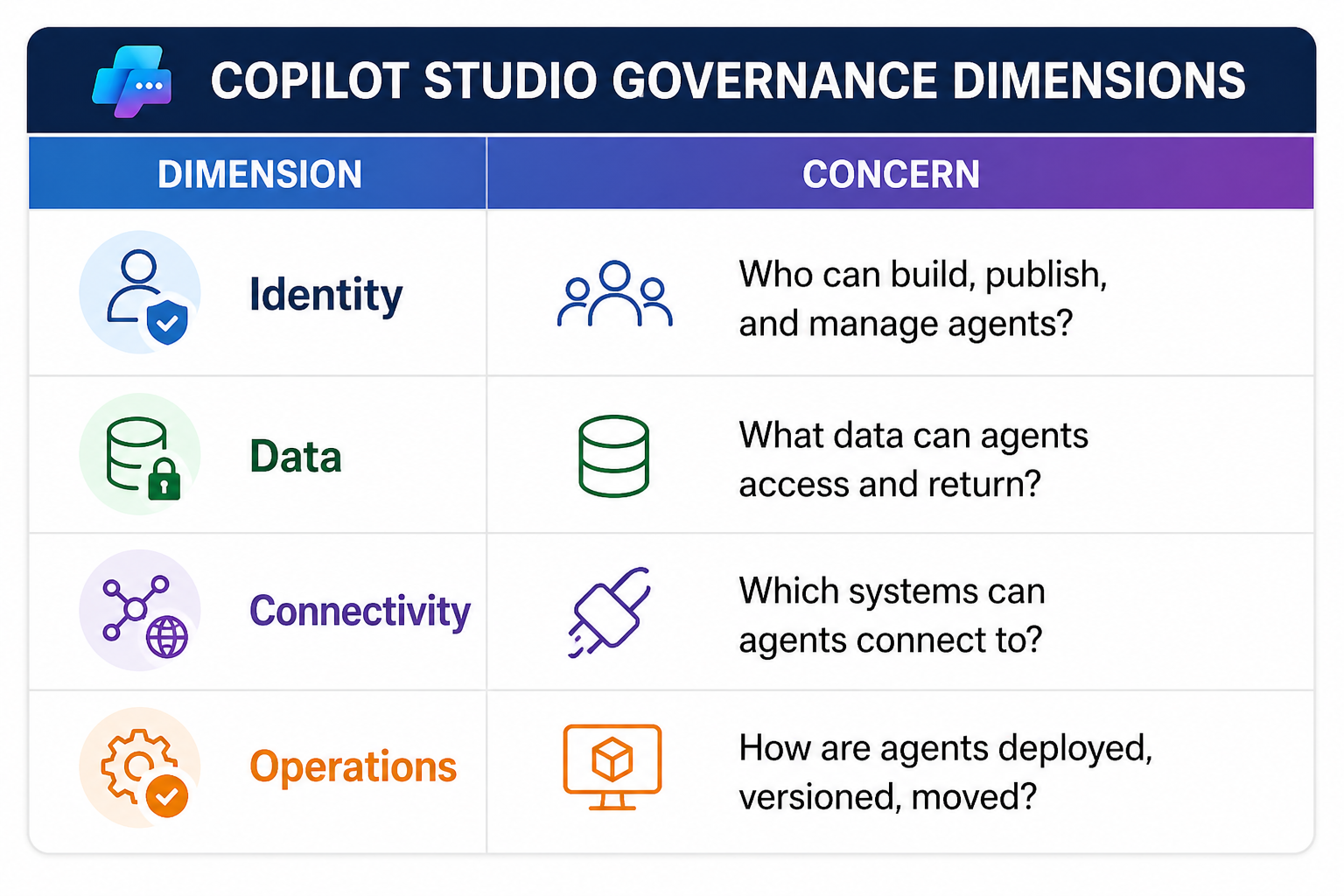
Each dimension has its own policy surface. Miss one, and you have a gap. Miss two, and you have an incident waiting to happen.
The challenge is compounded by **Microsoft Foundry**. Traditional Copilot Studio bots operate within the Power Platform boundary. But when you connect a Copilot Studio agent to a Microsoft Foundry-backed AI agent — which is increasingly the pattern for enterprise AI — you now have **two platforms, two security boundaries, and two governance surfaces** that must be aligned.
Most enterprise governance guides for Copilot Studio were written before this architecture existed. This one isn't.
Part 1: Environment Strategy — The Foundation Everything Else Is Built On
The most common governance mistake I see is a single **Default Environment** used for everything — development, testing, UAT, and production. This is a disaster waiting to happen.
The Three-Environment Minimum
For any enterprise Copilot Studio deployment, the minimum viable environment structure is:
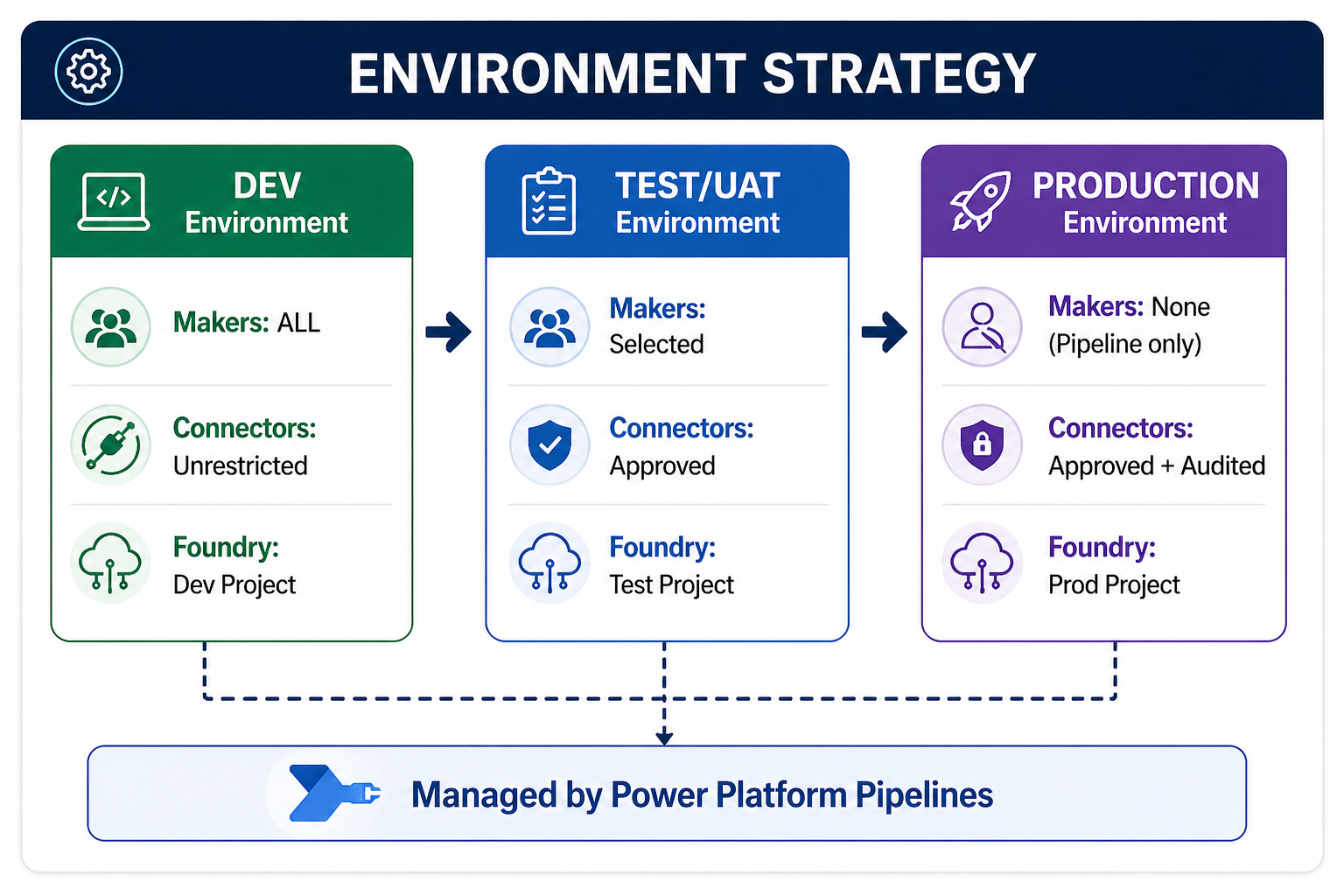
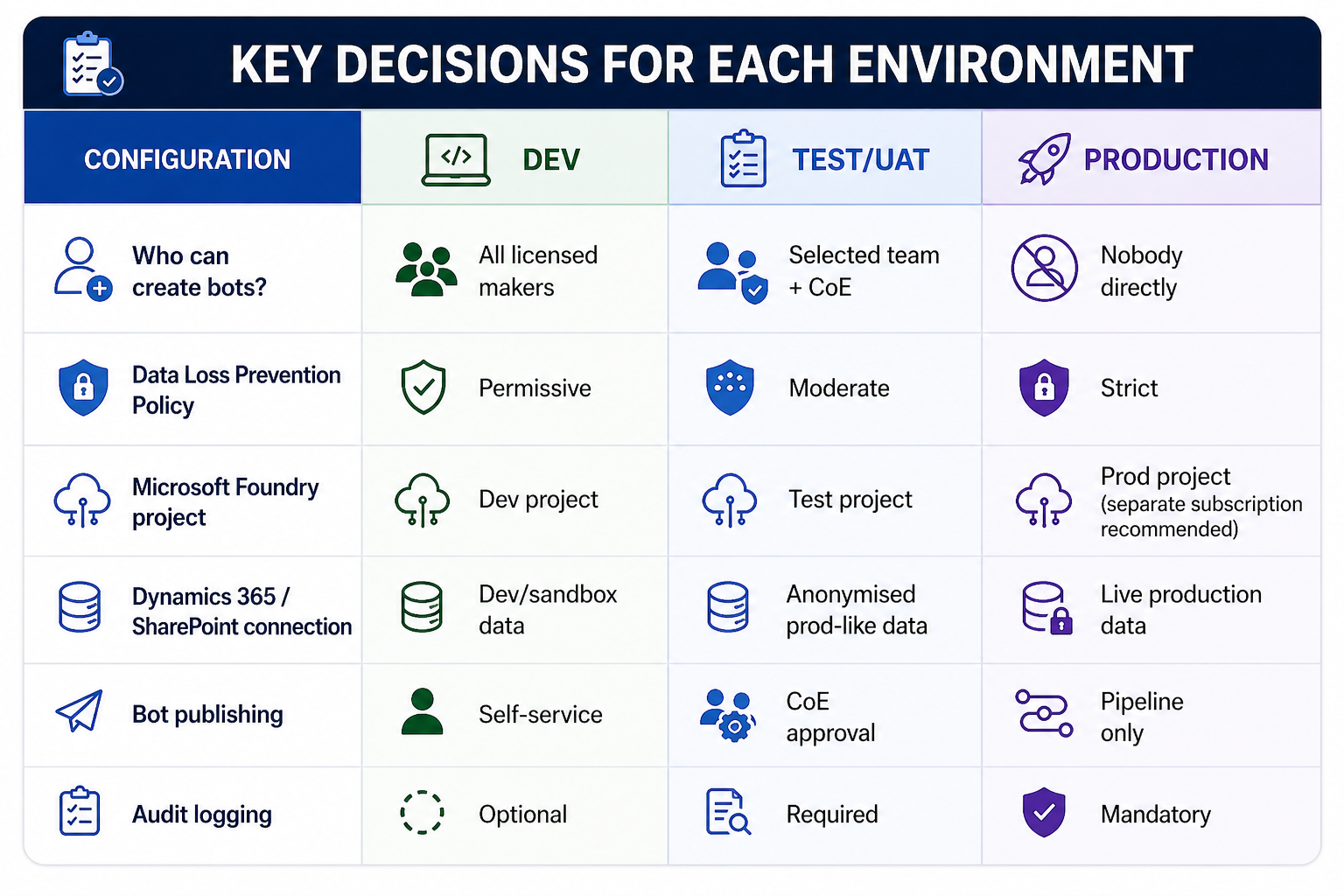
Key decisions for each environment:
Foundry Project Alignment
This is where most organisations miss a critical step. When your Copilot Studio agent calls a Microsoft Foundry agent (via the Foundry connector or custom plugin), the Foundry project that backs it must be **environment-aware**.
Do not share a single Foundry project across environments. Here's why:
- A Foundry project defines its own **AI model deployments**, **connections** (to Azure AI Search, Blob Storage, databases), and **prompt flows**.
- If Dev and Production share a Foundry project, a developer testing a new prompt flow change can accidentally affect production AI behaviour.
- Foundry projects do not have environment-level isolation — you must create separate projects and manage promotion explicitly.
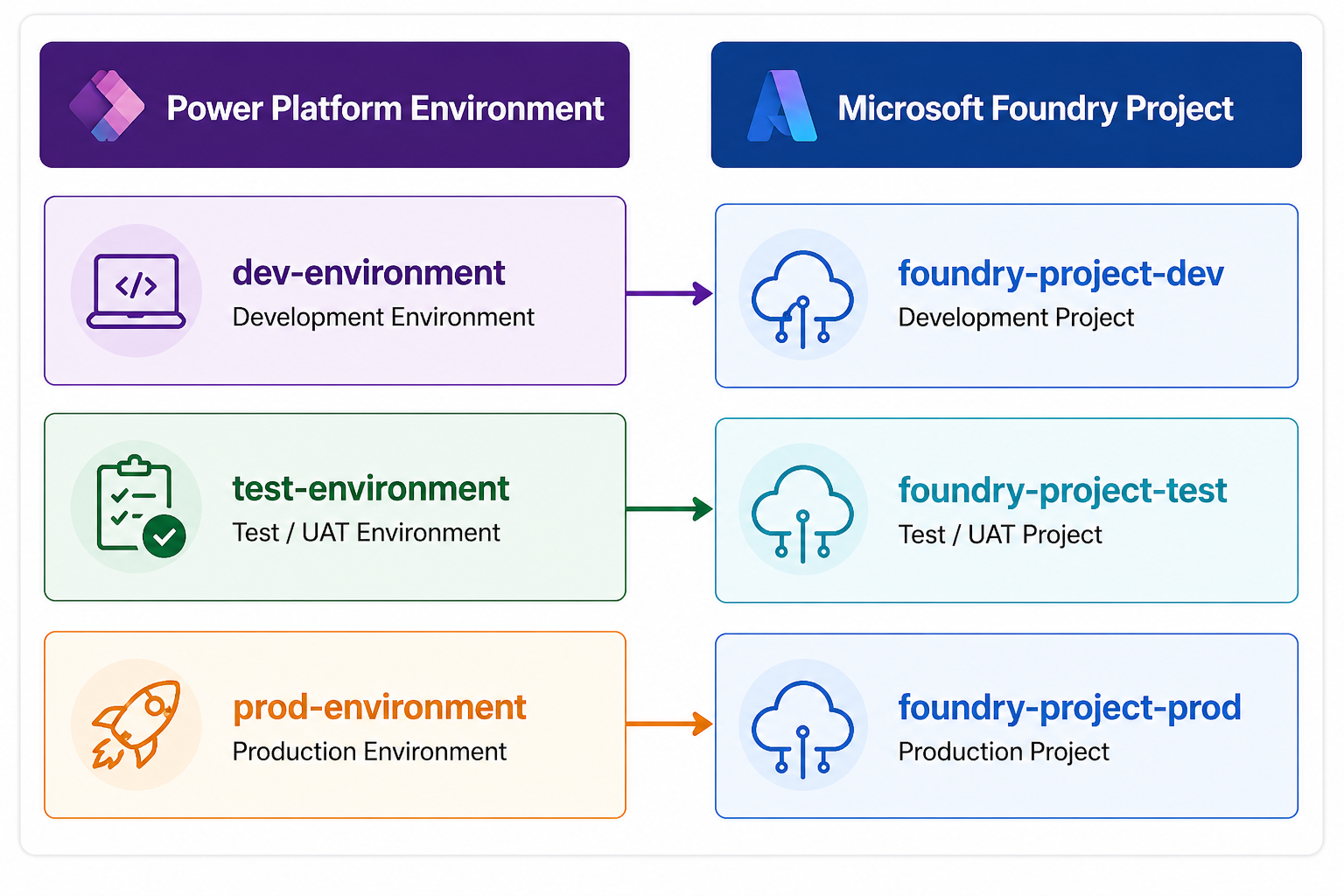
How to configure this in Copilot Studio:
When you create a Custom Connector or use the Microsoft Foundry connector in Copilot Studio, you define the endpoint. Parameterize these endpoints using **environment variables** in Power Platform — never hardcode the Foundry project endpoint.
[```yaml
# Environment Variable: FoundryEndpoint
# Dev value:
https://dev-foundry-project.api.azureml.ms/workspaces/{workspace-id}/

# Prod value:
https://prod-foundry-project.api.azureml.ms/workspaces/{workspace-id}/
```]
Part 2: Data Loss Prevention (DLP) Policies — The Connector Governance Layer
DLP policies in Power Platform are the most powerful and most misunderstood governance control available. They define which connectors can be used, and critically, which connectors can **talk to each other** within a bot flow.
Understanding Connector Classification
Power Platform DLP organises connectors into three buckets:
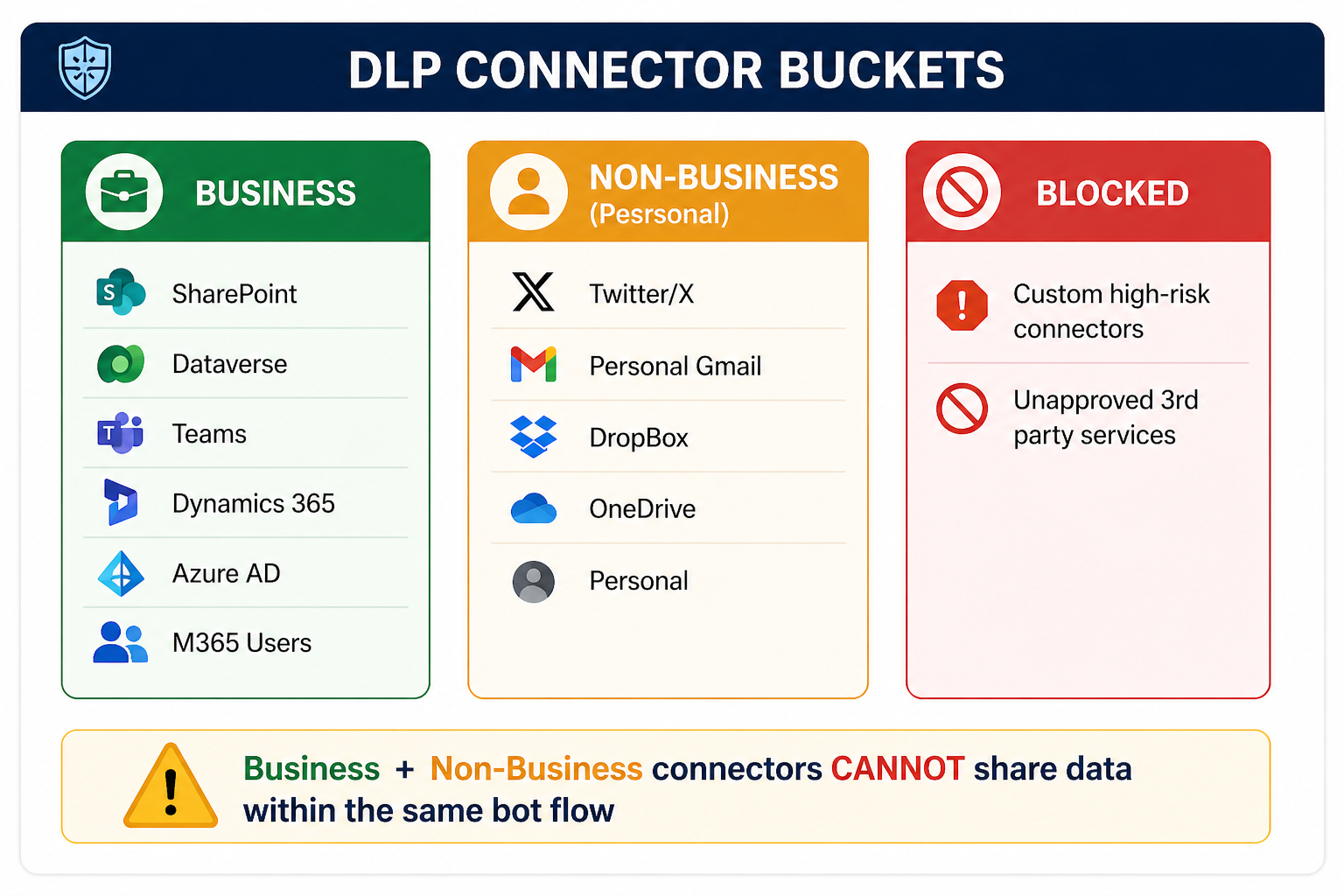
The critical rule: Connectors in the Business bucket and Non-Business bucket **cannot be used together** in a single bot conversation flow. This prevents a bot from taking data from your corporate SharePoint and sending it to a personal Dropbox.
Recommended DLP Policy for Copilot Studio
For enterprise production environments, I recommend the following DLP policy structure:
PRODUCTION DLP POLICY — COPILOT STUDIO ENTERPRISE
BUSINESS CONNECTORS (approved for enterprise data):
✅ Microsoft Dataverse
✅ SharePoint
✅ Microsoft Teams
✅ Office 365 Outlook
✅ Office 365 Users
✅ Azure AD
✅ Dynamics 365 (all flavors)
✅ Microsoft Foundry (Custom Connector)
✅ Azure Key Vault
✅ HTTP with Azure AD (for approved internal APIs)
NON-BUSINESS (personal/isolated — not allowed with business data):
⚠️ OneDrive (personal)
⚠️ Gmail
⚠️ Slack
⚠️ All non-Microsoft social connectors
BLOCKED (not permitted in production):
🚫 Any connector not in the above lists
🚫 HTTP (without Azure AD) — use HTTP with Azure AD instead
🚫 Custom connectors not registered with CoE
Configuring DLP via PowerShell (Automatable, Repeatable)
Never configure DLP policies manually in the admin center for enterprise scale. Use the Power Platform admin PowerShell module to codify and version-control your DLP policies:
```powershell

# Install required module

Install-Module -Name Microsoft.PowerApps.Administration.PowerShell -Force


# Connect to Power Platform Admin

Add-PowerAppsAccount


# Get existing DLP policies

$policies = Get-DlpPolicy

$policies | Select-Object DisplayName, PolicyId | Format-Table


# Create a new DLP policy for production environment

$policyDefinition = @{

    DisplayName = "Copilot Studio Production DLP Policy"

    EnvironmentName = "prod-environment-id"

    DefaultConnectorClassification = "Blocked"

}


# Define Business connectors

$businessConnectors = @(

    @{ ConnectorId = "/providers/Microsoft.PowerApps/apis/shared_sharepointonline"; ClassificationType = "Business" },

    @{ ConnectorId = "/providers/Microsoft.PowerApps/apis/shared_commondataserviceforapps"; ClassificationType = "Business" },

    @{ ConnectorId = "/providers/Microsoft.PowerApps/apis/shared_teams"; ClassificationType = "Business" },

    @{ ConnectorId = "/providers/Microsoft.PowerApps/apis/shared_office365"; ClassificationType = "Business" },

    @{ ConnectorId = "/providers/Microsoft.PowerApps/apis/shared_office365users"; ClassificationType = "Business" },

    @{ ConnectorId = "/providers/Microsoft.PowerApps/apis/shared_keyvault"; ClassificationType = "Business" }

)


# Apply the policy

New-DlpPolicy -DisplayName $policyDefinition.DisplayName `

              -EnvironmentName $policyDefinition.EnvironmentName `

              -DefaultClassification $policyDefinition.DefaultConnectorClassification


Write-Host "DLP Policy created. Connector classification in progress..."


# Apply connector classifications

foreach ($connector in $businessConnectors) {

    Set-DlpPolicyConnectorClassification `

        -PolicyId $newPolicy.PolicyId `

        -ConnectorId $connector.ConnectorId `

        -Classification $connector.ClassificationType

    Write-Host "Classified: $($connector.ConnectorId) as $($connector.ClassificationType)"

}
Governance Tip: Store this script in your organisation's Azure DevOps or GitHub repository and run it as part of your environment provisioning pipeline. Every new production environment should have DLP applied automatically — not manually.
Part 3: Maker Permissions & Role-Based Governance
One of the most frequently overlooked governance controls is **who can create, edit, and publish bots** — and the distinction between those three actions.
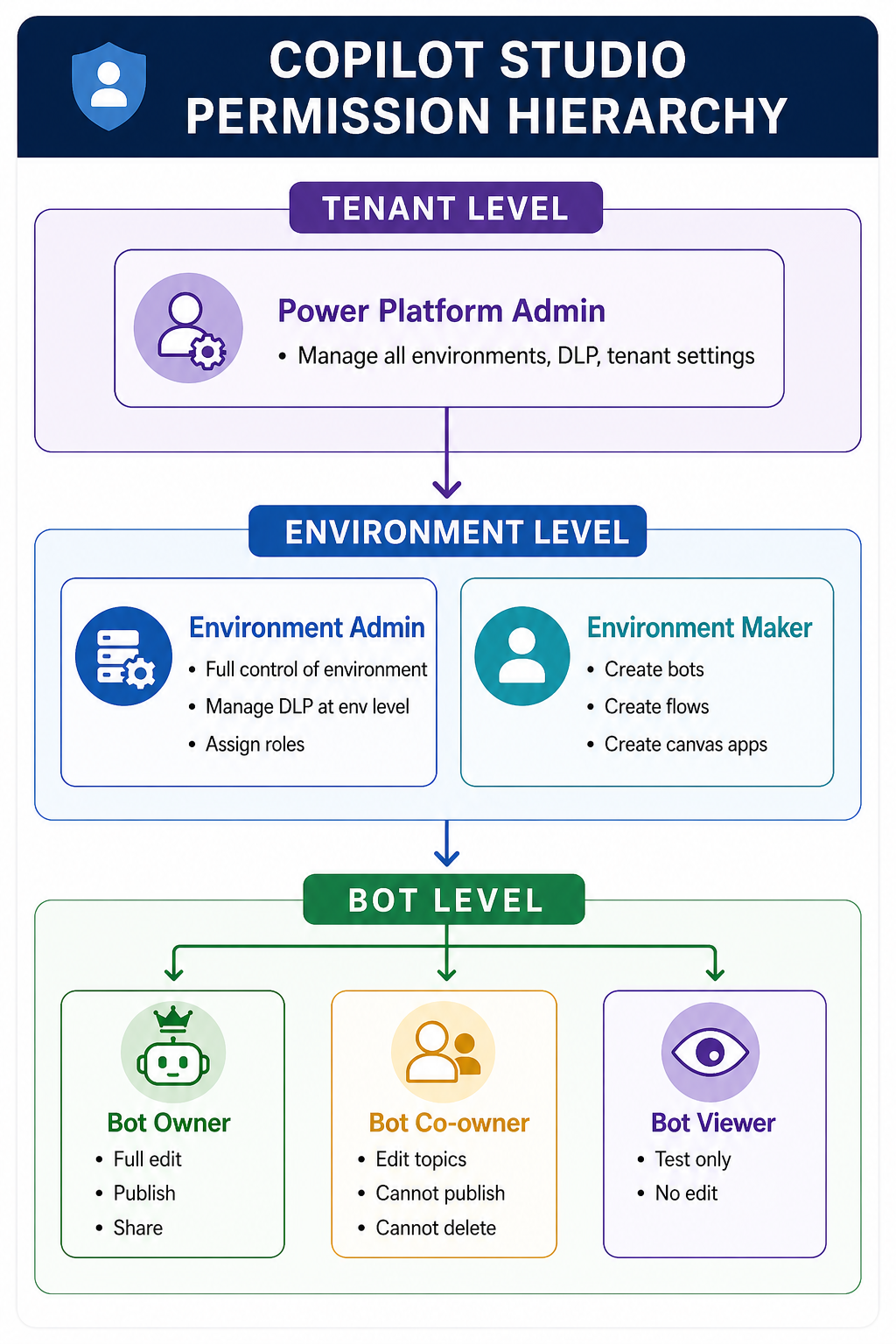
The Copilot Studio Permission Model
Copilot Studio uses Power Platform environment roles combined with its own bot-level sharing model:
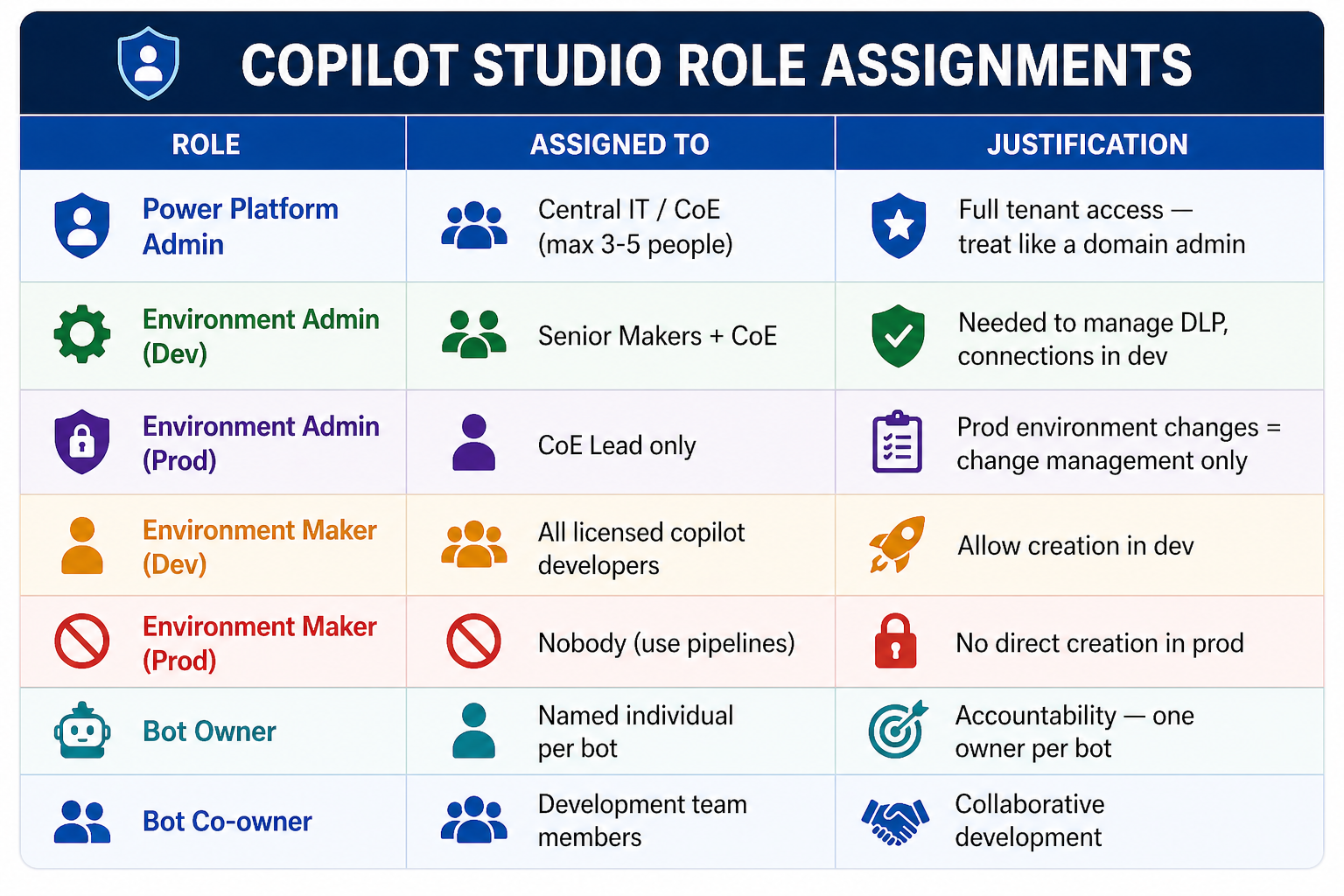
Governance-Aligned Role Assignments
The following matrix defines who should hold which role in a governed enterprise deployment:
Restricting Who Can Create Bots — Tenant Level Control
By default, any licensed user in your tenant can create a Copilot Studio bot in the Default Environment. Shut this down immediately for enterprise governance:
```powershell

# Restrict bot creation to specific security groups

# This cmdlet controls who can create Copilot Studio agents at tenant level


Set-TenantSettings -RequestBody @{

    "powerPlatform" = @{

        "governance" = @{

            "disableAdminDigest" = $false

            # Restrict Copilot Studio creation to CoE security group

            "enableDefaultEnvironmentRouting" = $true

        }

    }

}


# Lock down the Default Environment - prevent all new bot creation

Set-AdminPowerAppEnvironmentRoleAssignment `

    -EnvironmentName "default-environment-id" `

    -RoleName "EnvironmentMaker" `

    -PrincipalType "Group" `

    -PrincipalObjectId "disabled"  # Remove maker role from default env


Write-Host "Default environment locked. Bot creation restricted to governed environments."

```


---
Part 4: Microsoft Foundry — The New Security Boundary
This is the section that makes this governance guide different from everything else you'll find online. When you connect Copilot Studio to Microsoft Foundry, you introduce an **entirely new security boundary** that your DLP policies and environment controls don't cover.
The Foundry Security Boundary Explained
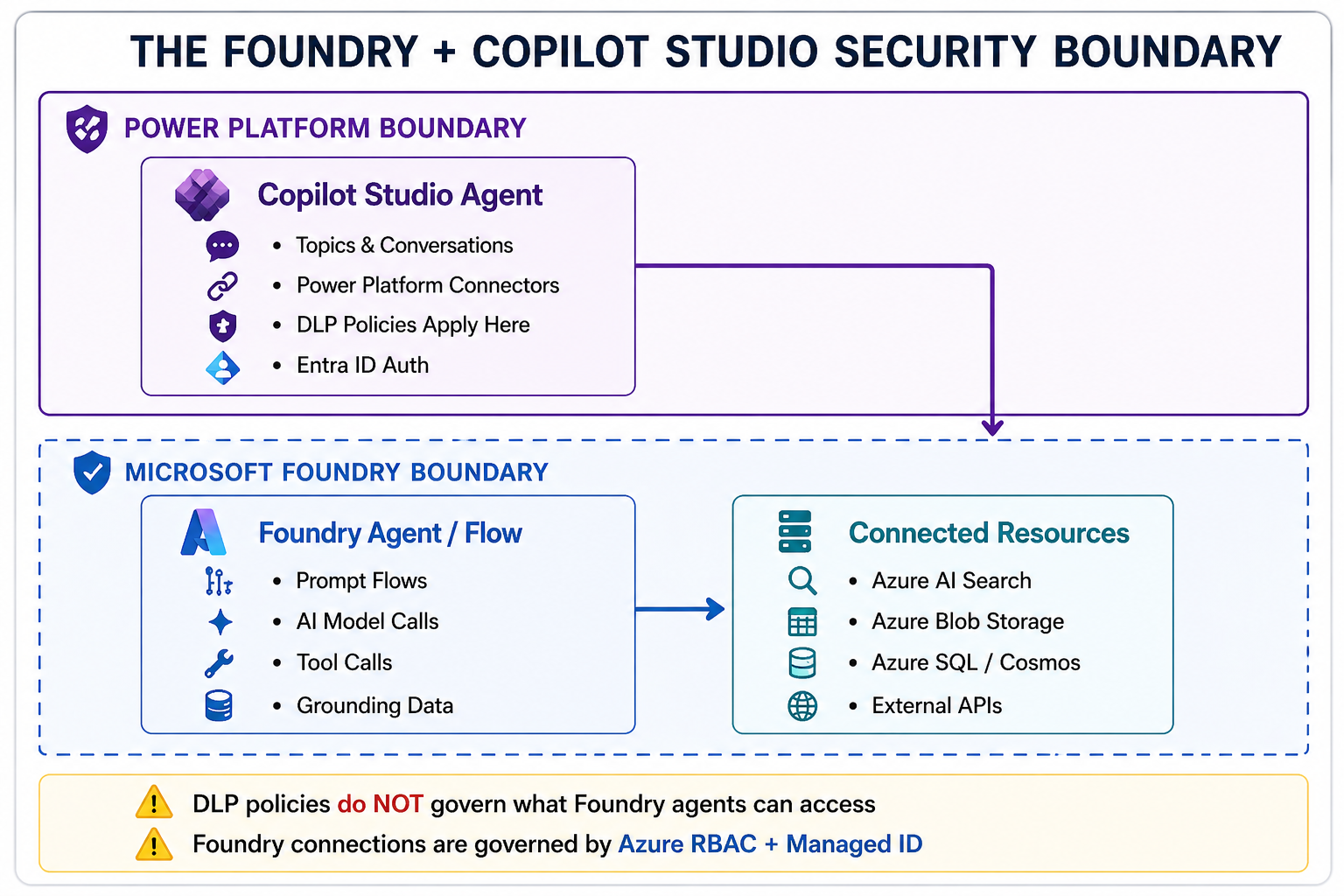
The critical insight: A Copilot Studio DLP policy that blocks the HTTP connector does **not** prevent a Copilot Studio bot from calling a Microsoft Foundry agent that internally uses HTTP to call external APIs. The DLP policy only sees the Foundry connector call — not what happens inside Foundry.
Governing the Foundry Connection from Copilot Studio
The Copilot Studio → Microsoft Foundry connection is established via one of these patterns:
Pattern A: Microsoft Foundry Connector (native)
Copilot Studio Topic
└─▶ Call action: "Microsoft Foundry - Run Agent"
├── Endpoint: [Environment Variable: FoundryEndpoint]
├── Authentication: Service Principal / Managed Identity
└── Input: {userMessage, conversationHistory, context}
Pattern B: Custom Connector (full control)
```yaml

# custom-connector-foundry.yaml (OpenAPI definition)

swagger: "2.0"

info:

  title: "Enterprise Foundry Agent"

  version: "1.0"

host: "prod-foundry.api.azureml.ms"

basePath: "/workspaces/{workspace-id}/agents"

schemes:

  - "https"

securityDefinitions:

  oauth2_auth:

    type: "oauth2"

    flow: "accessCode"

    authorizationUrl: "https://login.microsoftonline.com/{tenant-id}/oauth2/v2.0/authorize"

    tokenUrl: "https://login.microsoftonline.com/{tenant-id}/oauth2/v2.0/token"

    scopes:

      "https://ml.azure.com/.default": "Access Microsoft Foundry"

paths:

  /invoke:

    post:

      summary: "Invoke Foundry Agent"

      operationId: "InvokeAgent"

      parameters:

        - name: "body"

          in: "body"

          required: true

          schema:

            $ref: "#/definitions/AgentRequest"

      responses:

        200:

          description: "Agent response"

          schema:

            $ref: "#/definitions/AgentResponse"

definitions:

  AgentRequest:

    type: "object"

    properties:

      message:

        type: "string"

      sessionId:

        type: "string"

      context:

        type: "object"

  AgentResponse:

    type: "object"

    properties:

      response:

        type: "string"

      citations:

        type: "array"

      confidence:

        type: "number"

```
Foundry-Level Governance Controls
Once traffic reaches Microsoft Foundry, governance is enforced at the Azure level — not the Power Platform level. The key controls are:
1. Managed Identity for Foundry Connections
```python

# foundry_agent_security.py

# Configure Microsoft Foundry agent to use Managed Identity

# for all downstream resource connections


from azure.identity import ManagedIdentityCredential

from azure.ai.projects import AIProjectClient


# Use Managed Identity — no secrets in code or config

credential = ManagedIdentityCredential()


# Connect to Microsoft Foundry project

client = AIProjectClient(

    endpoint="https://prod-foundry.api.azureml.ms",

    credential=credential

)


# The Managed Identity must be granted specific roles:

# - "Cognitive Services User" on the AI model resource

# - "Search Index Data Reader" on Azure AI Search

# - "Storage Blob Data Reader" on Blob Storage

# - "Key Vault Secrets User" on Key Vault (for API keys)

# These are assigned via Azure RBAC — not stored in code


agent_config = {

    "name": "enterprise-hr-agent",

    "model": "gpt-4o",

    "instructions": "You are an HR assistant for Contoso. Only answer questions about HR policies.",

    "tools": [

        {

            "type": "azure_ai_search",

            "azure_ai_search": {

                "endpoint": "https://prod-search.search.windows.net",

                "index_name": "hr-policies-index",

                # No API key — using Managed Identity

            }

        }

    ]

}

```
2. Azure RBAC for Foundry Project Access
```bash

# Assign roles for Copilot Studio service principal to Foundry resources

# Run these commands during environment provisioning


# Service principal for Copilot Studio Custom Connector

COPILOT_SP_ID=""

FOUNDRY_RG="rg-foundry-production"

SEARCH_RESOURCE="prod-ai-search"

STORAGE_ACCOUNT="prodstorageaccount"


# Allow Copilot Studio to call Foundry agents

az role assignment create

  --assignee $COPILOT_SP_ID

  --role "Azure Machine Learning Workspace Connection Secrets Reader"

  --scope "/subscriptions/{sub-id}/resourceGroups/$FOUNDRY_RG"


# Foundry Managed Identity reads from AI Search

az role assignment create

  --assignee ""

  --role "Search Index Data Reader"

  --scope "/subscriptions/{sub-id}/resourceGroups/$FOUNDRY_RG/providers/Microsoft.Search/searchServices/$SEARCH_RESOURCE"


# Foundry Managed Identity reads from Blob Storage

az role assignment create

  --assignee ""

  --role "Storage Blob Data Reader"

  --scope "/subscriptions/{sub-id}/resourceGroups/$FOUNDRY_RG/providers/Microsoft.Storage/storageAccounts/$STORAGE_ACCOUNT"


echo "RBAC assignments complete. No connection strings or API keys used."

```
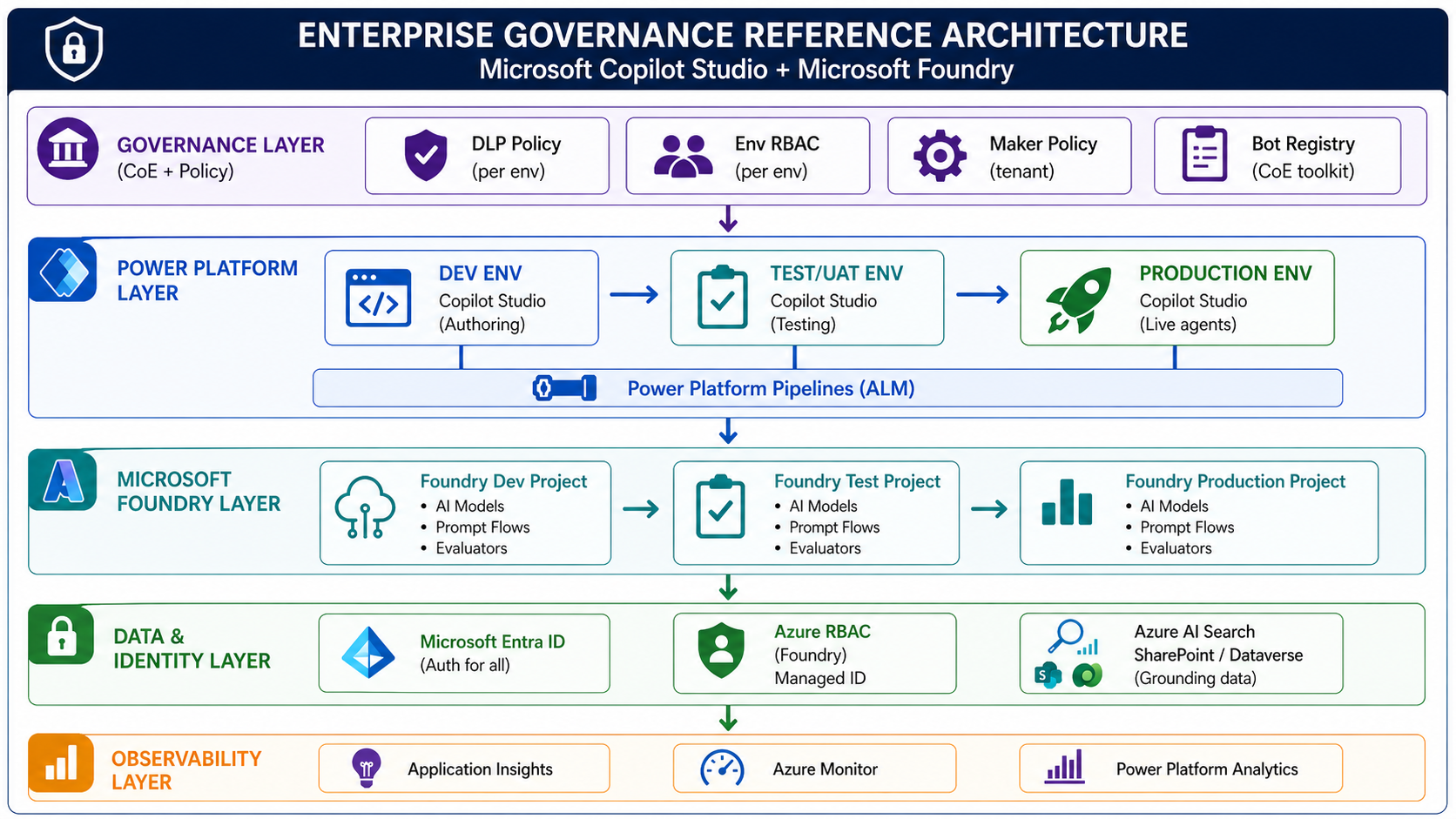
Part 5: The Governance Reference Architecture
Bringing it all together, here is the complete governance reference architecture for an enterprise Copilot Studio + Microsoft Foundry deployment:
Part 6: The Governance Checklist for Enterprise Readiness
Before any Copilot Studio deployment is considered production-ready in an enterprise, use this checklist:
Environment Governance
- [1] Three-environment strategy implemented (Dev / Test / Prod)
- [2] Default environment locked down (no new maker bot creation)
- [3] Environment variables used for all endpoint references (no hardcoding)
- [4] Separate Microsoft Foundry project per environment
Identity & Access
- [1] Service principal created for Copilot Studio → Foundry connection
- [2] Managed Identity configured for Foundry → downstream resources
- [3] No API keys or connection strings in code or configuration
- [4] Azure Key Vault used for any required secrets
- [5] Bot ownership assigned (one named owner per bot)
- [6] Environment Maker role removed from production environment
Data & Connector Governance
- [1] DLP policy applied to all environments (permissive in Dev, strict in Prod)
- [2] Default connector classification set to "Blocked" in production
- [3] Custom Connector registered with CoE before use
- [4] HTTP connector without Azure AD blocked in production
- [5] All connectors in production use OAuth2 / Azure AD authentication
Foundry-Specific
- [1] Azure RBAC roles assigned to Foundry Managed Identity (least privilege)
- [2] Copilot Studio service principal granted only required Foundry roles
- [3] Foundry project access reviewed and documented
- [4] Prompt flows versioned in source control
Operations
- [1] Power Platform Pipeline configured for bot promotion
- [2] Bot registered in CoE toolkit inventory
- [3] Audit logging enabled in all environments
- [4] Application Insights connected for conversation telemetry
- [5] Incident response runbook in place
Common Anti-Patterns to Avoid
Based on enterprise engagements, these are the governance anti-patterns I see most often:
Anti-Pattern 1: The "Default Environment Everything" trap
Using the Default Environment for production bots. The Default Environment cannot have scoped DLP policies and is visible to all licensed users in the tenant.
Anti-Pattern 2: Shared Foundry projects across environments
One Foundry project for all environments means a developer's experiment can affect production AI behaviour. Always isolate.
Anti-Pattern 3: Connection strings in bot variables
Storing API keys or Foundry endpoint secrets directly in Copilot Studio topic variables. Use Azure Key Vault + Managed Identity.
Anti-Pattern 4: Maker = Owner
The person who builds a bot should not automatically be its indefinite owner in production. Ownership should be a formal assignment with accountability.
Anti-Pattern 5: DLP policy as the only control
DLP governs Power Platform connectors — it doesn't govern what a Foundry agent does internally. Governance must extend to the Foundry layer.
Conclusion
Governance is not a feature you add to Copilot Studio after you go to production. It's the infrastructure you build before the first bot leaves development.
The combination of **Microsoft Foundry** and **Copilot Studio** is genuinely powerful — but it introduces two governance surfaces that must be aligned: the Power Platform boundary (DLP, environment strategy, maker permissions) and the Foundry boundary (Azure RBAC, Managed Identity, project isolation).
Organisations that build this foundation correctly will scale their AI agent programmes with confidence. Those that skip it will spend months unwinding decisions made in a two-week pilot.
Key Takeaways
1. Environment isolation is non-negotiable — three environments minimum, each with its own Microsoft Foundry project.
2. DLP policies govern Power Platform connectors — not Foundry internals.You need both layers.
3. Managed Identity over service account passwords — always, for Foundry connections.
4. Lock down the Default Environment — it's a governance gap that's easy to close and easy to miss.
5. Parameterise all endpoints — environment variables in Power Platform, not hardcoded URLs.
6. Bot ownership is accountability — one named owner per production bot.
Resources
- Microsoft Foundry Documentation
- Copilot Studio Environment Strategy
- Power Platform CoE Starter Kit
- Managed Identity for Azure ML